
Converse Court Docket Searches
Start with the live Converse Tyler portal. The search form takes several key combinations. You can pair a citation number with a birth date. A license number and state can go with a birth date. Other options include a plate and state, a name and birth date, or a business name. The citation number works best. It also shares the least personal data. If the portal leaves a docket question open, call the court at 210-658-8021.
- Identify the issuing agency and confirm that Converse Municipal Court is named.
- Use the citation or case number instead of a broad name search when possible.
- Allow the city’s stated processing window for a new citation.
- Read the charge, plea, status, and next Converse court date.
- Call the clerk to verify a setting or ask about a record not shown online.
Not every Converse case belongs to the city. Felonies and district civil cases sit with the Bexar County District Clerk. County-level misdemeanors and many county civil matters go through the Bexar County Clerk. The Bexar Odyssey portal can help you locate those files. It does not replace the Converse municipal docket. Search each court that could hold your case.
Converse Portal Migration Check
The city's old court page on the city domain has gone dark. The city-branded Tyler portal stayed live. Treat that as a maintenance sign, not proof a case vanished. Bookmarks often outlive a redesign. Vendor screens can fail during service work too. Keep the current portal address and a clerk fallback ready. Search by citation. Write down the result date. Then call the court whenever the paper notice and the screen disagree. The clerk can confirm a setting change and explain how to get a copy.
Recent ticket: An empty online result during the posting window does not cancel the appearance duty shown on the citation.
Inside Converse Municipal Court
Converse Municipal Court is a court of record under its official material. That matters for the formal record used on appeal. But it does not put every document or identifier on the payment portal. The municipal clerk controls the case file. The court sits at 406 S. Seguin Road, Converse, TX 78109. The phone is 210-658-8021, and the fax is 210-658-8030. Email goes to court@conversetx.net. Check current official material before a visit. Contact details can shift when pages change.
Converse Municipal Court
406 S. Seguin Road
Converse, TX 78109
210-658-8021
Weekdays, generally 8:00 a.m. to 4:30 p.m.; verify before visiting.
Converse Search Form Details
The official search page pairs several lookup keys with a date of birth. It also posts sign-in and card-fee notices. The official appearance page shows why the case type must be checked before choosing a route.
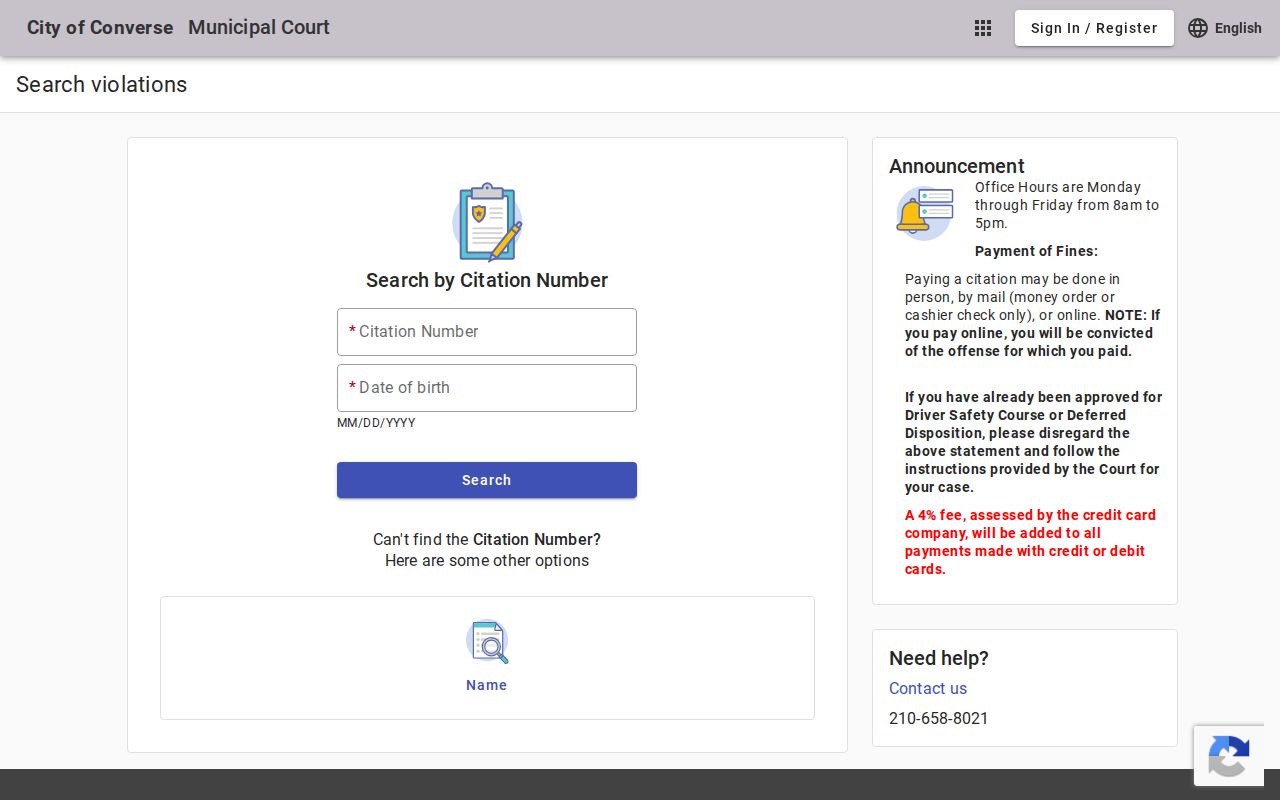
That page ties each docket entry to the city's own procedure choices. It shows why a Converse case may still need clerk review. That is true even when a payment link appears. Local rules set deadlines for written continuance requests and pretrial motions. Read the procedure that fits your setting. Never assume an online transaction settles everything.
Finding Converse Court Dates
Read a Converse court setting as a set of fields. Do not stop at the date. Confirm which case it belongs to. Check whether it is in person or through an approved remote option. Note the event type. It may be an appearance, a pretrial matter, or a trial. After a reset, a later docket event can replace an earlier setting.
| Date | The scheduled day shown on the Converse docket or notice. |
|---|---|
| Time | The check-in or session time, which may differ from the moment a case is called. |
| Location | The city court room, counter, or approved remote appearance route. |
| Case | The citation or case number that ties the setting to the correct file. |
| Setting Type | The listed appearance, pretrial, trial, compliance, or other event. |
Confirm any change with the clerk. A written request sitting in a queue is not an approved continuance. If a Converse court date is near and the online record clashes with your notice, call the court before trusting either screen.
Converse Search Privacy Choices
The portal offers many keys, and more data is not always better. Citation number plus birth date narrows results to one known matter. A name search can pull up more than one person. SSN use exposes far more data than a routine citation lookup needs.
Each tool has its own job. The search route locates the Converse record. Registration may save portal details, while the payment control starts a transaction. For status, options, and copies, the clerk answers directly. Match the channel to the task and keep proof of any submission. A portal receipt alone proves payment. It does not show whether a request or disposition made it onto the docket.
Converse Traffic Ticket Lookups
A ticket filed in Converse Municipal Court stays a city record. Search the city portal first. Before acting, ask the Converse clerk about defensive driving, deferred disposition, dismissal, or a copy. The portal does not decide eligibility. A request is not approved until the court acts on it. Checkout is not a neutral search step either, since paying online can carry conviction consequences. A citation here differs from other venues county-wide. For that, see the Bexar County traffic court record resource.
Converse Special Case Handling
Some municipal cases cannot go through the fastest online path. Juvenile, minor-alcohol, family-violence, animal, and code-compliance matters may require a direct appearance or review. The public Converse docket never displays some details. These categories can hold such details too. Ask the clerk what the public record contains and what proof a copy requires.
- Continuance
- A court-approved move of a setting to a later date.
- Pretrial motion
- A written request for a ruling before trial, subject to local filing deadlines.
- Disposition
- The recorded result of the charge, such as a judgment, dismissal, or other final action.
- Deferred option
- A court-approved path that may postpone final judgment while terms are completed.
Never assume a request moved your Converse court date until the docket or the clerk confirms it. Keep a copy of the submission and note when you delivered it.
How Converse Cases Reach County
Converse Municipal Court has a narrow job. It hears city ordinance violations and fine-only Class C cases that happened inside the city. Anything bigger, like a county misdemeanor, felony, major civil dispute, or district family case, belongs to a Bexar County court no matter where the event took place.
Docket flow: Converse Municipal Court › Bexar County Courts › District Court
Match your docket search to the court level. The Bexar County Clerk holds many county files. Misdemeanor, probate, and county civil records sit there. Felony and district civil records sit with the Bexar County District Clerk. On Bexar Odyssey, the public tools are named Smart Search and Search Hearings. A re:SearchTX query covers the whole state and adds a layer. Only the originating clerk can issue an official copy.
Converse City Growth Context
The official Census profile supplies the 2020 population used for the city ranking.
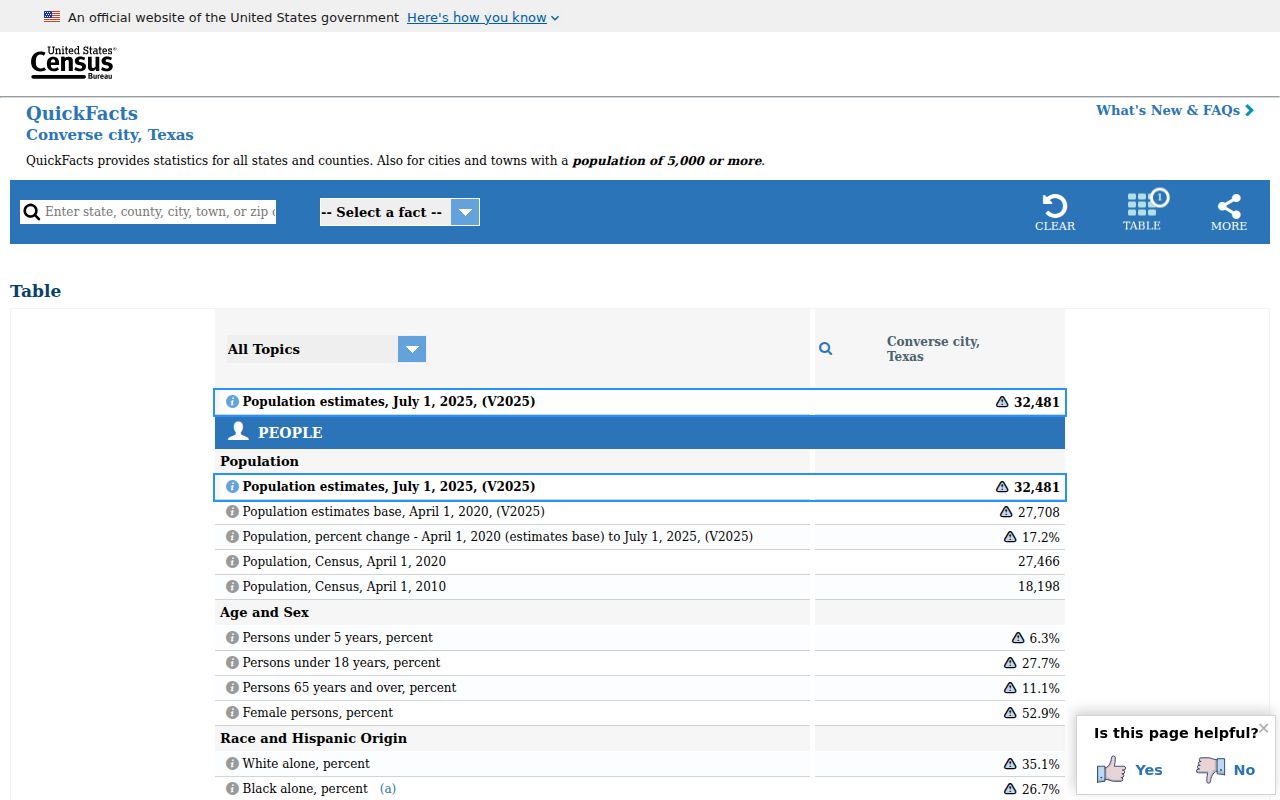
Converse earns its place here on size, but population never routes a case. The issuing court and the filing level decide whether the record stays municipal or lands with a Bexar County clerk.
Who Can See Converse Court Records
Texas does not settle court access with one simple rule. Judicial records fall under the Texas Rule 12 process. Filed case records follow the court rules and laws governing that file. The Texas Public Information Act covers government information broadly. It does not make every court case item an open online record.
Sealed files, juvenile records, and protected personal data may never surface in a public Converse court search. Ask the municipal clerk directly instead. Give the citation or case number. Name the record. Say whether a plain or certified copy is needed.
Converse is called a court of record, yet a portal result is not the full appellate record. Ask what documents can be released, what identification or fee applies, and how certification works. For a higher-level Bexar case, take the request to the County Clerk or District Clerk. Do not use the city vendor.
Exact matches matter in the Converse portal. The birth date field rides along with the citation, license, and name routes. The plate route needs its state. A business-name search takes its own path. Write down the field used and the date searched. Do this before calling the clerk. Staff can then reproduce the problem without sensitive identifiers in email.
When you request a Converse copy, cite the citation, the defendant, and the exact docket item. Say whether a plain or certified copy fits the need. The portal can locate a case but may not display the signed judgment, motion, or complete appeal record. The municipal clerk, not the payment vendor, decides what gets released.
Email suits a narrow procedure question. Never place an SSN or similar identifier in an ordinary message. Cite the case or citation number and ask which secure route accepts required proof. Keep the reply. Then check the Converse docket again once staff process the request.
Key access rules:
Online access is a convenience, not the official file.
Restricted material remains protected even when a public docket entry exists.
Verify the Converse court record with the clerk that maintains it.